

Rows for Xero
Xero to Excel, and back again.
Pull reports and records, edit them, post them back. No need to open Xero. Ask AI Assist in Rows when you're stuck, or connect Rows MCP to any AI tool.
Online sign-up opens on 20 November.
 Your Xero entity

Ask AI Assist in Excel
Pull with Run Report. Post back with the Bulk Editor.
- Under 1 minto refresh a full month end pack
- 10,000+accountants and finance teams since 2017
- 5+countries, Malta first
- 24 hoursto a reply from support, on working days
About the integration
One sign-in. Every Xero entity.
Rows is a Xero Excel integration that runs as an add-in. Sign in to Xero once in the Rows pane, choose the entities you look after, and pull their figures into Excel. Ask AI Assist about them, or connect Rows MCP to any AI tool.
- Excel for Windows and Mac
An Office add-in, installed once from Microsoft Marketplace.
- Every entity you manage
Connect every Xero entity you look after.
 Xero Practice Manager
Now part of Xero Partner Hub. Jobs, time and client billing: pull them into Excel and post changes back, the same way as Xero.
Use cases
What you can do with your Xero data in Excel.
For accountants running month end for many clients, and finance teams closing their own books.
Month end pack for every client
Start from the Management report template: trial balance, balance sheet and profit and loss from one set of dates, with up to 24 comparative periods. Next month, change the date and refresh.
Built with: Management report template
Accruals and journals in bulk
Type or paste a month of journal lines into the Manual journals editor, with drop-downs for your accounts, tax rates and tracking categories. Post them as drafts for review in Xero, or straight away.
Built with: Bulk Editor, Manual journals
Aged receivables before you chase
Run Outstanding Receivables, or open the Aged receivables template and set your own day ranges. Refresh it the morning you send reminders.
Built with: Outstanding Receivables, Aged receivables template
Bills without typing
Send bills to Capture mode by upload, folder or email. Check each line in a sheet, then post to Xero as a draft, awaiting approval or authorised.
Built with: Capture mode
Run reports
Every Xero report, as a live Excel table.
Pick a report, set the period and press Run Report. You get reports for Xero, or the raw data behind them in 28 data tables, as normal Excel tables you can format and chart. Pull the same report for each entity and compare them side by side.
 Malta Ltd • EUR
Reports for Xero
16 reports in two groups:
See all 16 reports
Rows Reports (11)
- Trial Balance, multiple periods
- Account Transactions
- Profit and Loss, multiple periods (multi-currency)
- Balance Sheet, multiple periods
- Bank Statement, multiple accounts
- Outstanding Receivables
- Outstanding Payables
- Profit and Loss, account details
- Balance Sheet, account details
- Exchange Rates
- Payment details for SEPA/BACS/CHAPS
Standard Xero Reports (5)
- Trial Balance
- Bank Summary
- Aged Receivables by Contact
- Aged Payables by Contact
- Executive Summary
Multi-period reports: set the month, how many periods and the order, and the columns lay themselves out. The profit and loss is multi-currency, for entities that trade in more than one currency.
Raw Xero data
28 data tables in four groups:
See all 28 tables
- Transactions, core (9)
- Invoices, Invoices/Credit Notes, Invoice/Credit Note Lines, Credit Notes, Repeating Invoices, Quotes, Purchase Orders, Expense Claims, Billable Expenses
- System configuration (12)
- Accounts, Currencies, Tax Rates, Tracking Categories, Items, Employees, Users, Organisation, Branding Themes, plus your Rows entities, login history and audit trail
- Assets (3)
- Assets, Asset Types, Settings
- Projects (4)
- Projects, Projects Users, Tasks, Time
Refresh in place
Press Refresh and the same table picks up the latest Xero figures. Tick several sheets and refresh them together. Add your own formulas next to a report: they're still there after every refresh.
Switch on Automatic Refresh and the report updates each time you open the workbook.
Link a setting to a cell, so changing one cell updates the report.
Report templates
Start from a finished report.
Templates are ready-made Excel reports for Xero, opened from Use Rows Templates in the Run Report pane. Set the date and periods on the first sheet and refresh. Add your own sheets and columns: your calculated columns fill down on every refresh.
6 report templates for Xero
See all 6 templates
- Management reportTrial balance, balance sheet and profit and loss from one set of dates, with up to 24 comparative periods
- Advanced management reportMap accounts to your own report groups for a monthly profit and loss and balance sheet, with a cover sheet and your own checks
- Smart profit and lossProfit and loss by month, up to 36 periods, with slicers. Double-click a figure to see the lines behind it
- Smart invoices reportInvoices and bills by contact, with slicers and a timeline
- Aged receivablesAgeing at any date in day ranges you set, as a summary or invoice by invoice
- Aged payablesThe same view for the bills you owe
Bulk Editor
Check it in Excel. Then post it to Xero.
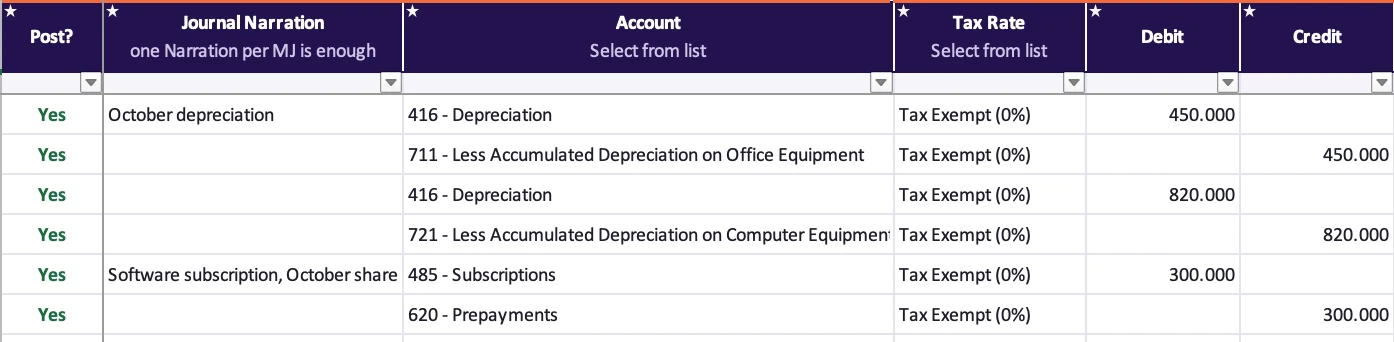
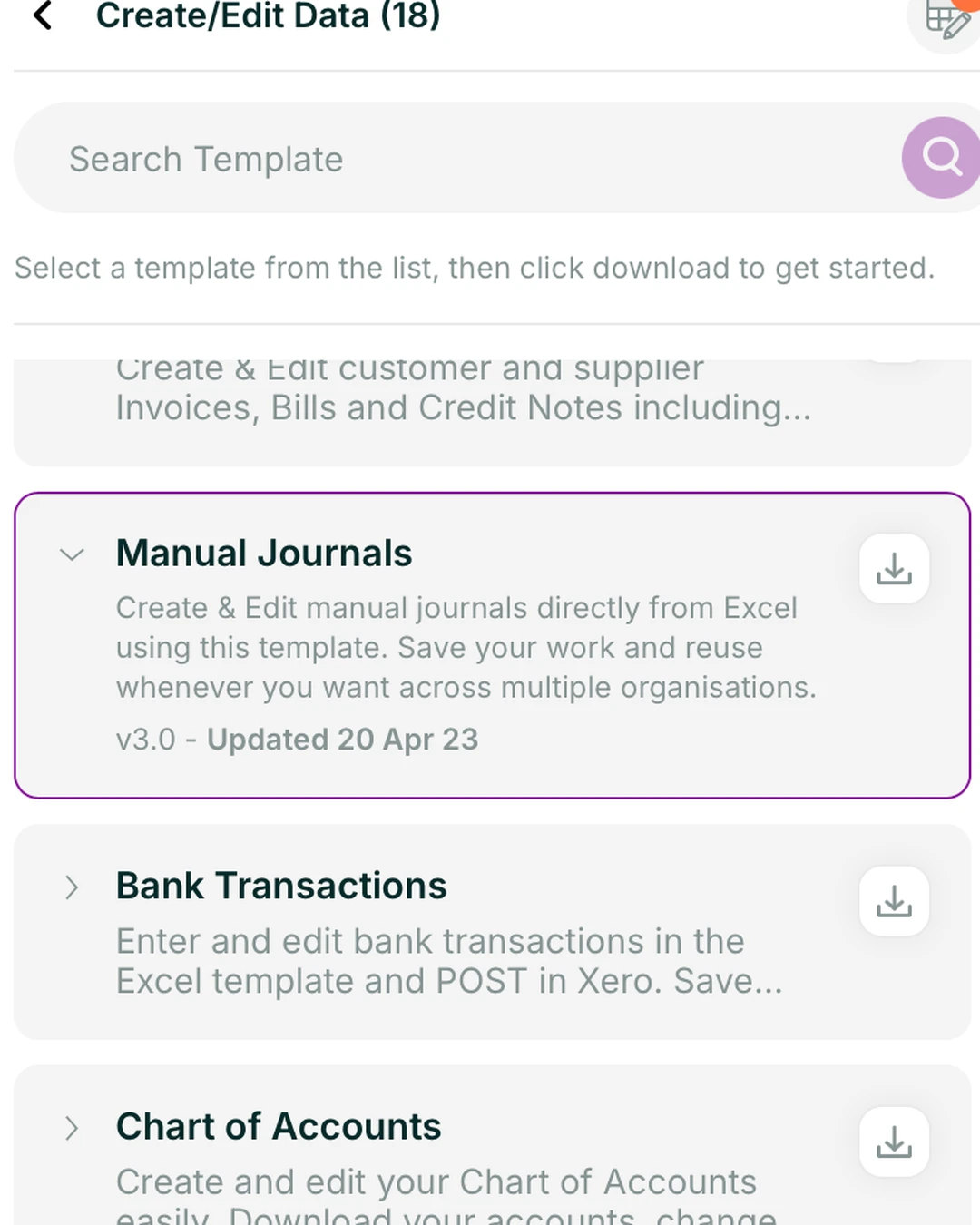
The Bulk Editor creates and updates Xero records straight from Excel. Download an editor from Create & Edit Data in the Rows pane, type or paste the lines, or pull existing records in to change them. Set Post? to Yes on the lines to send, then save them as drafts to review in Xero, or post them straight away.
See all 17 editors for Xero

 17 editors for Xero
Invoices, bills and payments · Manual journals · Bank transactions · Chart of accounts · Bank transfers · Batch payments · Contacts · Contact groups · Tracking categories · Purchase orders · Quotes · Items · Repeating invoices · Projects · UK payroll timesheets · AU payroll timesheets · Xero Conversion Tool, for moving several entities onto Xero
- Drop-downs load your Xero accounts, contacts and tax rates, so every line uses valid values.
- Rows checks debits equal credits and flags any missing required field in red before you post.
- Nothing changes until you confirm. Rows lists what will change in Xero and waits for you to press Proceed.
- Posted lines switch off, so the same journal can't go twice.
- Pull existing records in, edit them, or void them, then post the changes back.
NewCapture mode reads your bills from an upload, a folder or email, puts each line in a sheet for you to check, and posts to Xero when you say so. See Capture mode →
Setup
Connect Xero to Excel in four steps.
- 1
- 2
Connect Xero
Sign in with Xero, Google or Microsoft in the Rows pane, then add your entities. Switch between them from the pane menu.
- 3
Run reports
Run a report, then refresh it whenever the books change.
- 4
Post back or ask
Post changes back to Xero, or ask AI Assist or any AI tool over MCP.
Security
Your Xero data stays yours.
You control the connection
You sign in on Xero's own page, so Rows never holds your Xero password. Revoke access there at any time.
Your figures are read live
Reports and posting read your figures live. Rows keeps only the documents you send to Capture, and any data copy you ask for until its download link expires.
Nothing posts until you confirm
Posting from Excel or Capture mode always goes through an approval step before anything changes in Xero.
Support from Malta
A reply within 24 hours on working days, from the team that builds Rows.
Rows MCP vs Xero's connector
Xero's connector is free. Rows MCP covers every client.
It lets Claude read one Xero entity at a time. Rows MCP does that in any AI tool, then adds what a firm with many clients needs: several entities in one question, clients on Xero, QuickBooks Online and Zoho Books alike, and the same figures in Excel to check before anything posts.
Online sign-up opens on 20 November.
Rows vs XO Report
Both read Xero. Only one posts back.
Both put Xero figures in Excel. Rows also sends changes back to Xero and covers QuickBooks Online and Zoho Books.
| Feature | XO Report | Rows |
|---|---|---|
| Accounting platforms | Xero | Xero, QuickBooks Online, Zoho Books |
| Post data back to Xero | No, read-only | Yes, after review in Excel |
| Several Xero entities in one workbook | Yes | Yes |
| Excel for Windows and Mac | Yes | Yes |
| MCP connection for AI tools | Not listed | Yes |
| AI assistant inside Excel | Not listed | AI Assist |
| Capture bills into Xero | Not listed | Capture mode |
XO Report details from its Xero App Store listing and website. Not listed: not mentioned there.
Rows vs Xero CSV
CSV files are free. Rebuilding them every month isn't.
Xero's import and export are fine for a one-off job. For month end, every export is out of date once the books change, and every import needs a new file. Rows works from the sheet you already have open.
| Feature | Xero CSV | Rows |
|---|---|---|
| Cost | Free with Xero | Paid plans, free trial with no card |
| Reports stay up to date | No, each export is a one-off file | Yes. Press Refresh, or switch on Automatic Refresh |
| Several entities | One at a time | All of them from one sign-in |
| Getting records into Xero | A new file in Xero's import layout each time | Type or paste into an editor, with drop-downs of your accounts, contacts and tax rates |
| Checks before Xero changes | Xero checks the file when you upload it | Rows checks debits equal credits and flags missing fields, then waits for you to press Proceed |
| Edit existing records | Some, such as contacts and items. Invoices and bills: new ones only | Pull them in, edit or void, post back |
| Record types | A fixed set, including contacts, invoices, bills, bank statements and manual journals | 17 editors |
Xero details from Xero Central.
Works with
Clients on QuickBooks Online or Zoho Books too?

Xero
You're here

QuickBooks Online
Live reports and posting back

Zoho Books
Live reports
All integrations
Xero Practice Manager, Cin7 Inventory, Excel and MCP
Rows is built on the same foundation as DataDear, by the same team, and adds AI Assist, Rows MCP and Capture mode.
Does Xero integrate with Excel?
Xero can export a report as a spreadsheet, but it won't update. Rows is an Excel add-in that pulls live Xero reports and records into Excel, refreshes them in one click and posts changes back to Xero.
How do I connect Xero to Excel?
Add Rows for Excel from Microsoft Marketplace, open the Rows pane and sign in to Xero. Pick your entities, choose a report and press Run Report. It lands as an Excel table you can refresh.
Can I export Xero to Excel and keep it up to date?
Yes, without exporting. Rows pulls the report into Excel once. Press Refresh for the latest Xero figures, or switch on Automatic Refresh and it updates each time you open the workbook.
Which Xero reports can I pull into Excel?
16 reports, including the trial balance over several periods, account transactions, a multi-currency profit and loss and the balance sheet over several periods, bank summary, and aged receivables and payables. Plus 28 raw data tables, from tracking categories and invoice lines to tax rates, and six ready-made report templates such as the Management report.
Can I import manual journals into Xero from Excel?
Yes. Rows has a Bulk Editor for manual journals, with drop-downs for your accounts, tax rates and tracking categories, plus 16 more editors for invoices, bills, bank transactions, contacts and more. Nothing is sent until you set Post? to Yes on a line and confirm. Save records as drafts to review in Xero, or post them straight away.
Is Xero's MCP connector free? Why use Rows MCP?
It is, with a Xero subscription, for one Xero entity at a time and read-only. Rows MCP connects the same AI tool to every client you look after, on Xero, QuickBooks Online or Zoho Books, and keeps the figures in Excel so you can check them. The Rows vs Xero MCP page sets the two side by side.
Does it work with more than one Xero entity?
Yes. Connect every entity you look after and pull the same report for each, side by side in one workbook.
Is it safe to connect Xero to Rows?
Yes. You sign in on Xero's own page, so Rows for Excel never holds your Xero password, and you can revoke access there at any time. Reports read your figures live without storing them on Rows servers, and nothing is posted to Xero until you confirm it.
Does Rows work with Excel for Mac?
Yes. Rows for Excel runs in Excel for Windows and Excel for Mac, so you can bring Xero data into either. Install it once from Microsoft Marketplace.
Open Excel. Connect Xero. Run Report.
Free trial, no card needed.
Xero is included in every Rows plan. See plans and prices →
Online sign-up opens on 20 November. Until then, email support@rowsapp.com.