
DataDear and Rows

Same team, same login, more in Excel.

Rows is built on the same foundation as DataDear, by the same team, and adds AI Assist, Rows MCP and Capture mode.

Online sign-up opens on 20 November.

Trusted by accountants since 2017Excel for Windows and Mac
Since 2017DataDear
TodayRows

Everything DataDear did, plus

  • AI Assist
  • Rows MCP
  • Capture mode

Rows today

Live figures in Excel, and back again.

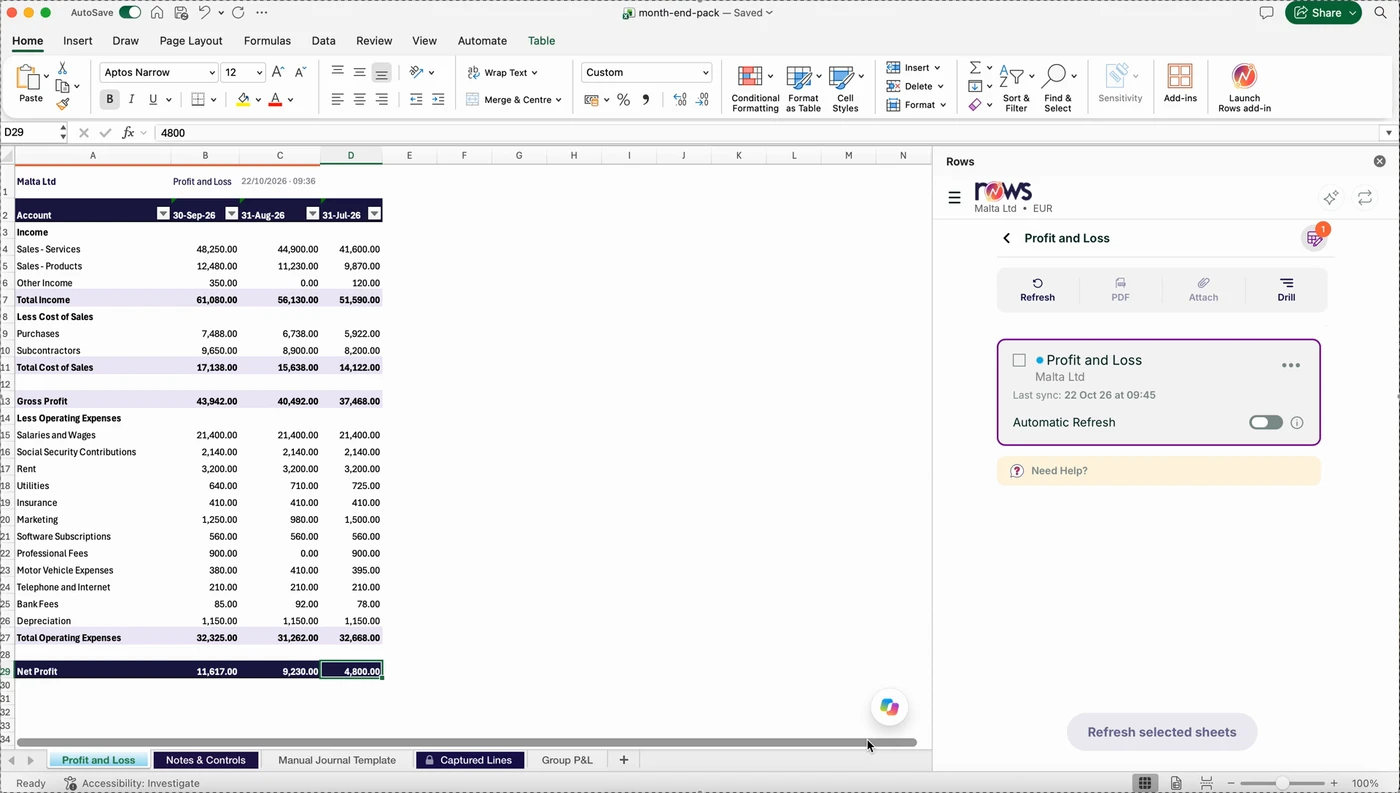
Rows connects Excel for Windows and Mac to Xero, QuickBooks Online and Zoho Books. Build a report once, refresh it every month after, and send changes back to your books.

Rows for Excel in Excel for Mac: a profit and loss for Malta Ltd, July to September 2026, refreshed from Xero
A Xero profit and loss in Excel for Mac, refreshed with one click.
  • Run live reportsTrial balance, profit and loss, balance sheet, aged receivables and more, straight from your books.
  • Refresh in one clickUpdate every sheet in the workbook. Your own formulas keep working.
  • Post back to your booksJournals, invoices and contacts from Excel templates to Xero and QuickBooks Online, with a check before anything posts.
  • AI Assist and Rows MCPAsk about your figures inside Excel, or connect Claude, ChatGPT, Microsoft Copilot or Cursor to your books.
  • Capture mode NewSend a bill or receipt. Rows reads it and gets it ready to post.

Our story

Nine years of month ends, one team.

We started DataDear in 2017 to put live Xero figures into Excel, and we’ve built Excel add-ins for accountants and finance teams ever since.

Rows is what we built next, from Malta, on the same foundation. The people who build it also write the guides.

  1. 2017

    DataDear puts live Xero figures in Excel

    Reports that refresh in place, instead of another CSV export.

  2. By 2019

    QuickBooks Online joins

    The same live reports and posting, for QuickBooks Online.

  3. 2026

    Zoho Books joins

    Live Zoho Books reports in the same add-in.

  4. Today

    Rows

    Everything above, plus AI Assist in Excel, Rows MCP for your AI tool, and Capture mode for bills and receipts.

What stays, what’s new

Everything you relied on, plus three new tools.

Everything you relied on still works. Here is what is new.

DataDear and Rows for Excel compared by feature
FeatureDataDearRows
Same as before
Xero and QuickBooks Online to Excel
Zoho Books
Multi-entity, refresh in place
Report and posting templates (36)
New in Rows
AI Assist in Excel
MCP access for AI tools
Capture mode

For DataDear users

You’re all set.

Your account comes with you, exactly as it is. There’s nothing to move and nothing to set up again.

  • Same login

    Log in with the email and password you already use.

  • Entities stay connected

    Your Xero, QuickBooks Online and Zoho Books entities stay connected.

  • Workbooks refresh as before

    Your workbooks and templates refresh just as they did.

  • Subscription carries on

    Your subscription carries on as it is.

The only change

Swap the DataDear add-in in Excel for the Rows add-in.

Get the Rows add-in

Old DataDear links and the old app address now bring you here or to the right page.

Contact us 

How Rows is built

What nine years of month ends taught us.

The rules Rows follows, learnt from the accountants and finance teams who have used it since 2017.

  1. 1

    Your workbook stays yours

    Refresh updates the figures, and the formulas you built around them keep working.

  2. 2

    Nothing posts without a check

    Rows shows what it’s about to post and asks you to confirm. Posted lines switch off, so nothing goes in twice.

  3. 3

    Read live, not copied

    Reports read your books when you run or refresh them. Your figures stay in Xero, QuickBooks Online or Zoho Books.

  4. 4

    The right access for each person

    Choose which entities, and which reports, each person on your team can see.

  5. 5

    A trail for every post

    Every post is logged in an audit trail, so you can see what went into your books from Excel.

  6. 6

    Many entities, one workbook

    Switch between entities in the Rows panel, or pull several side by side in the same report.

See how Rows compares with other tools 

< 1 min

to refresh a full month end pack

10,000+

accountants and finance teams since 2017

5+

countries, Malta first

24 hours

to a reply from support, on working days

Proof

Rated by the people who use it.

Rated by DataDear users

Reviews of DataDear, built by the team behind Rows, from accountants and finance teams on G2.

4.1 / 5 12 DataDear reviews on G2

Listed on Microsoft Marketplace

Rows is listed on Microsoft Marketplace, Microsoft’s store for Office add-ins, where Excel users rate it.

4.0 / 5 4 ratings on Microsoft Marketplace

Used by firms including

BDOGovernment of MaltaWH PartnersdMSCSigmaGVZHQuazarTrustmooreNephos GroupBajada Lyons

How we work

People you can actually reach.

Built in Malta

Rows is designed, built and supported by one team in Malta.

A reply within 24 hours

On working days, from the people who build Rows.

Guides from the builders

Every guide in the help centre is written by the people who build Rows.

You control the connection

You sign in on your platform’s own page, so Rows never holds your password. Revoke access there at any time.

Talk to the teamEmail support@rowsapp.com. We reply within 24 hours on working days.

Find the Rows that fits how you work.

Your first live report in less than two minutes.

Start the free trial, add Rows to Excel, connect your books, press Refresh.

  • 14 days free
  • No card needed
  • Excel for Windows and Mac

Online sign-up opens on 20 November. Until then, email support@rowsapp.com.