Management accounts for finance teams
Your management accounts, live in Excel.
Pull Xero, QuickBooks Online or Zoho Books figures into the board pack you already use. Refresh it in one click and spend month end on the numbers, not the exports.
Online sign-up opens on 20 November.
 Malta Ltd • EUR
Before Rows
Month end shouldn’t start with an export.
Export the profit and loss, paste it into the pack, check nothing moved.
The pack refreshes in place, in under a minute.
Accruals worked out in Excel, then keyed in all over again.
Post them from the same workbook, after you confirm.
A pile of bills to type in, line by line.
Send them to Capture mode and check the lines.
How Rows helps
Month end without the copy and paste.
What changes for a finance team of one, or of ten.
One pack for the board
Your management accounts in your own layout, with your KPIs and formulas beside the figures. Refresh from the books and they’re still there.
Xero · QuickBooks Online · Zoho Books
Trends without the copy and paste
Several months, quarters or years in one run, so this month sits next to last month and last year.
Xero · QuickBooks Online
Fewer manual journals
Post a month of journals in one go, with the workings attached as support. Save them as drafts in Xero to review first.
Xero · QuickBooks Online
Tidy up your chart of accounts
Add, rename or archive accounts in bulk from Excel, instead of one screen at a time.
Xero · QuickBooks Online
Report the way you’re organised
By tracking category in Xero, or by class and department in QuickBooks Online, so each team sees its own numbers.
Xero · QuickBooks Online
Bills captured, not keyed
Send a bill by upload, email or a shared folder. Rows reads the supplier, dates, lines and tax, and nothing posts until someone says yes.
Xero · QuickBooks Online · Zoho Books
A closer look
What it looks like in Excel.
Run reports
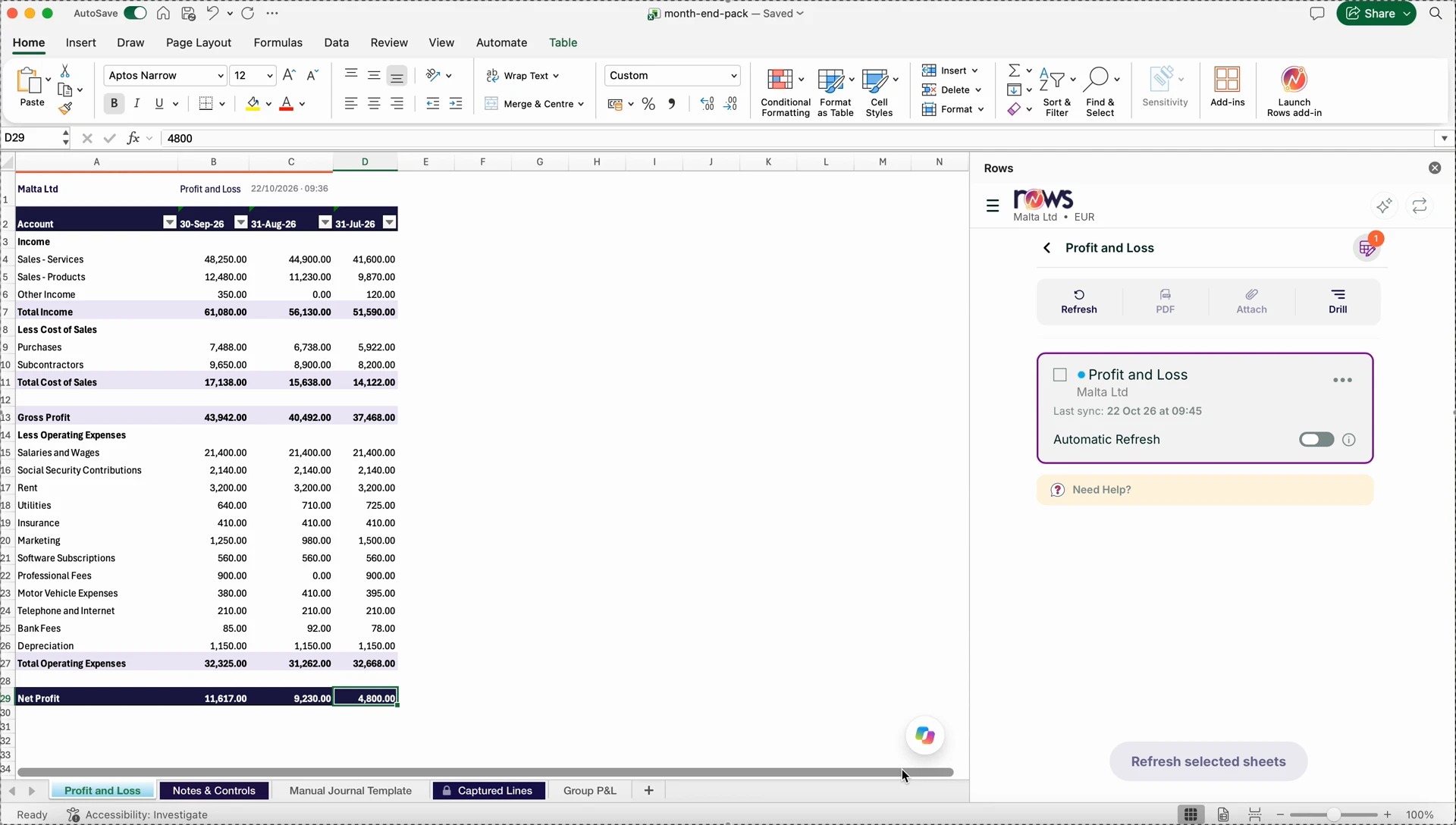
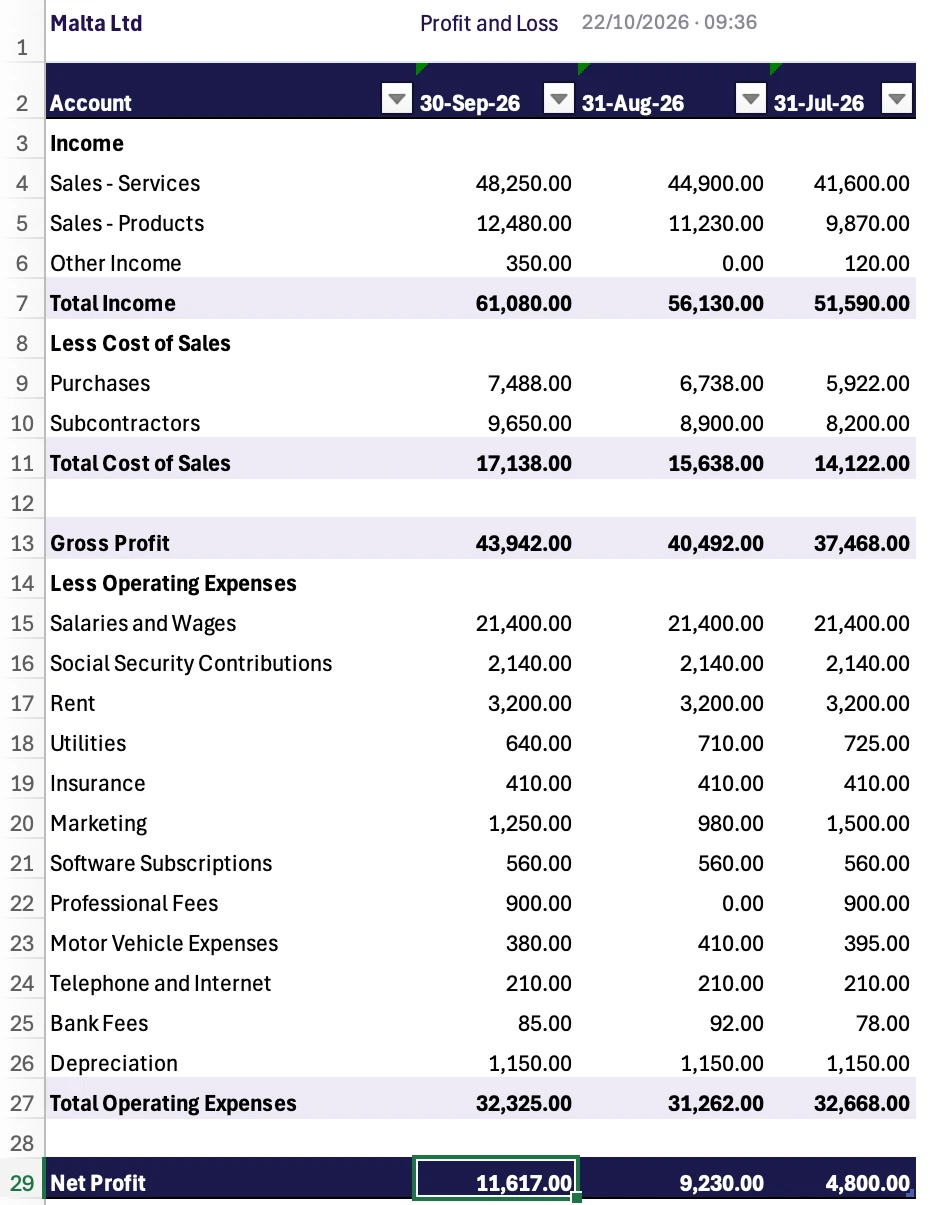
Your board pack, refreshed in under a minute.
Choose a report in the Rows panel, set the dates and run it into the pack. Next month, press Refresh and the new figures land in the same place.
- Profit and loss, balance sheet and trial balance across months, quarters or years
- Formulas and KPIs you add next to a report survive every refresh
- Refresh one sheet, several or the whole pack, or switch on auto-refresh and it updates each time the workbook opens
- Colleagues on your licence refresh the same pack for the same entity
Capture mode
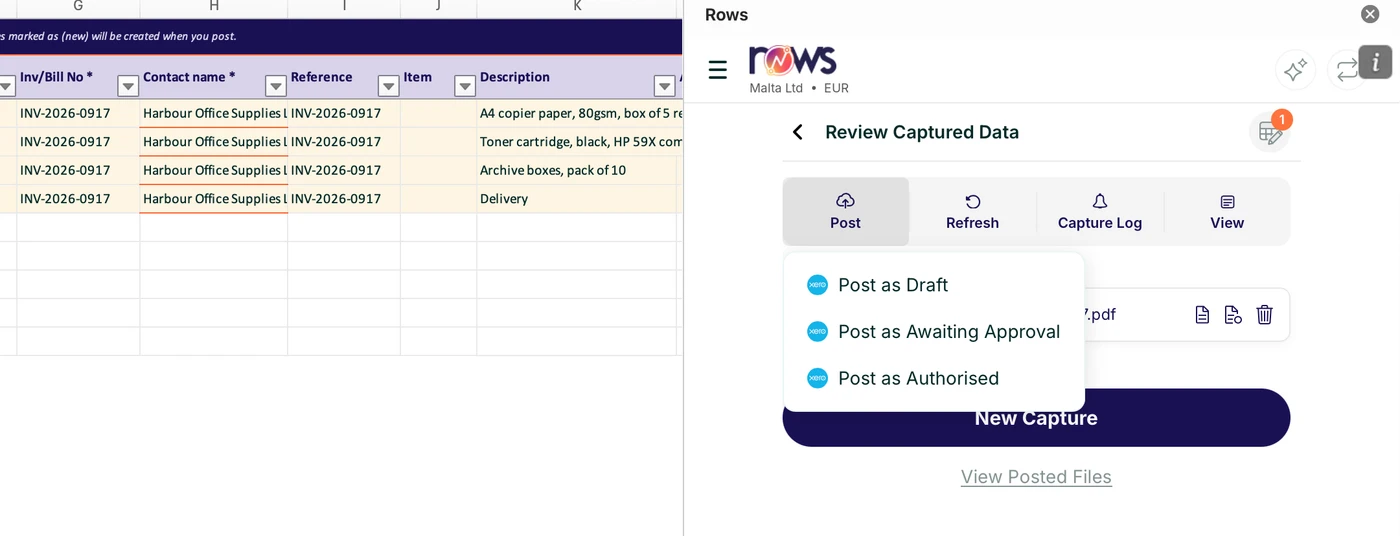
Bills in. Lines out. You decide what posts.
Upload a bill, email it to your capture address or drop it in a linked folder. Rows reads it and brings the lines into Excel to check.
- Reads the supplier, bill number, dates, line items, tax and tracking
- Learns how your business codes its costs from a short profile
- New suppliers are marked (new) and created when you post
- Every line starts as “don’t post” until someone reviews it
 Post as Draft
Ask
Ask a question. Get a table back.
AI Assist lives in the Rows panel. Ask in plain English and it builds a live Rows table you can refresh, filter and check.
- “Show me all bills for October” becomes a table in a new sheet
- Rows MCP gives any AI tool the same live figures
- Works across Xero, QuickBooks Online and Zoho Books
Report templates
Start from a management accounts template.
Open a report template from the Rows panel, point it at your entity and run it. Every template works in the free trial, and there are posting templates for journals, invoices, bills, contacts and more.
- Management report
Trial balance, balance sheet and profit and loss as one pack, with comparatives.
Xero · QuickBooks Online - Advanced management report
Map accounts to your own sections and groups, with checks that turn red when the pack doesn’t balance.
Xero - Smart profit and loss
Up to 36 months as a pivot with slicers. Double-click a figure to see the lines behind it.
Xero · QuickBooks Online - Aged receivables and payables
Ageing groups you can edit, with summary and detailed views.
Xero - Smart invoices report
Invoices and bills by contact, with slicers and a timeline.
Xero
Your month, with Rows
Built around the month end you already run.
Set it up once. After that, the same four steps each month.
- 1
Set up
Connect your entity and tidy the chart of accounts.
Chart of accounts template
- 2
Prepare
Capture bills and post journals from Excel.
Capture mode · journal template
- 3
Report
Refresh the board pack in one click.
Run Report · Refresh
- 4
Close
Check the pack. Every post is logged.
Template checks · audit trail
Who it’s for
Finance teams that live in Excel.
A finance team of one
You close the month and write the board pack. Rows takes the exporting off your list.
Finance directors and controllers
One management pack the board recognises every month, with figures you can trace back to the books.
Businesses with a few entities
Run the same report for each entity and keep them side by side in one workbook.
Security
Your data stays where it is.
Read live, not copied
Reports read your figures when you run or refresh them. Your data stays in Xero, QuickBooks Online or Zoho Books.
Nothing posts without a yes
Before a post, Rows lists what will change and asks you to confirm. The audit trail logs every post and who sent it.
Access per person
Give each person only the entities they need, and choose which reports they can run for each.
You control the connection
You sign in on your platform’s own page, so Rows never holds that password. Revoke access there at any time.
Where to next
Works with the software you already use.

Xero
Live reports and posting back
Rows for Xero
QuickBooks Online
Live reports and posting back
Rows for QuickBooks Online
Rows MCP
Ask any AI tool about your figures, with Rows MCP.
See Rows MCPCapture modeNew
Send a bill and get lines back to review. Nothing posts until you say yes. Posts to Xero and QuickBooks Online; reads bills for Zoho Books.
See Capture modeaccountants and finance teams since 2017
to refresh a report
to a reply from support, on working days
Rows is built on the same foundation as DataDear, by the same team, and adds AI Assist, Rows MCP and Capture mode.
4.1 / 5 12 DataDear reviews on G2How do I prepare monthly management accounts in Excel?
Run the profit and loss, balance sheet and trial balance from your accounting software into your pack with Rows, over as many months as you need. Add your KPIs beside them. Next month, press Refresh.
Is there a management accounts template for Excel?
Yes. Rows comes with a management report template (trial balance, balance sheet and profit and loss as one pack) for Xero and QuickBooks Online, and an advanced version for Xero with your own report sections and balance checks.
Do I need to be an accountant to use Rows?
No. If you use Excel, you can use Rows. Pick a report by name in the Rows panel, choose the dates and run it into your sheet.
Can I report by department or region?
Yes. Report by tracking category in Xero, or by class and department in QuickBooks Online.
Is it safe to post from Excel?
Rows asks you to confirm before anything posts, and every post is logged in the audit trail. In Xero you can save journals as drafts and approve them there.
Can colleagues work on the same pack?
Yes. Add them as users, give each one access to the entities they need and the reports they can run, and they refresh the same workbook.
How much does Rows cost?
Rows is a paid subscription with a free trial, and you don’t need a card to start. Every plan includes Xero, QuickBooks Online and Zoho Books, and every template works in the trial.
Your next board pack, one click away.
Free trial, no card needed.
- Connects to Xero, QuickBooks Online and Zoho Books
- Works in Excel for Windows and Mac
- Support replies within 24 hours on working days
Online sign-up opens on 20 November. Until then, email support@rowsapp.com.