Reports and posting back
Stuck in Excel? Rows Assist to the rescue
Ask in plain words in the Rows pane. Rows Assist, the AI built into Rows, pulls your figures into Excel, suggests a report or explains a number.
- Less than 2 minutes


 Xero, QuickBooks Online and Zoho Books
- Excel for Windows and Mac
 Demo Company (Global) • USD
Before you ask Rows Assist
- An entity connected to Rows. If not, start with Connect Xero to Excel, Connect QuickBooks Online to Excel or Connect Zoho Books to Excel.
- The Rows pane open in Excel for Windows or Mac. Rows Assist is on every plan.
Get your data into Excel with Rows Assist
Open Rows Assist
In ExcelCheck that your entity's name is under the Rows logo in the Rows pane: Rows Assist works with that entity. Then select the sparkle icon at the top right to open the chat.
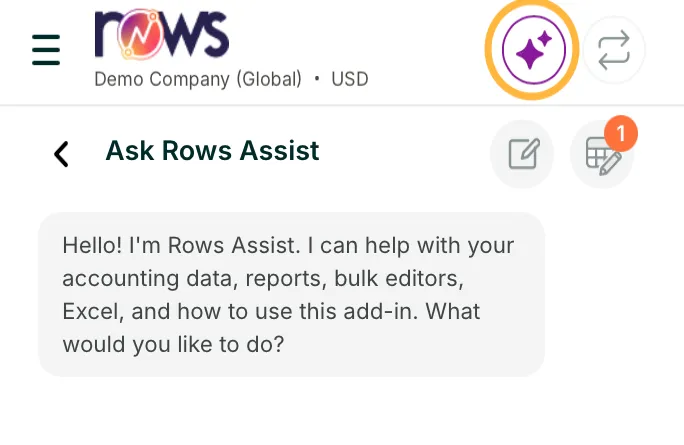
Rows pane, Rows Assist Ask for your data in plain words
In ExcelType in the Ask Rows Assist box as you'd ask a colleague, and select the arrow. Name the record and the period, such as Show me all bills for October 2026 or I want to see all invoices for this month. It leaves your other sheets as they are, unless you ask it to change one.
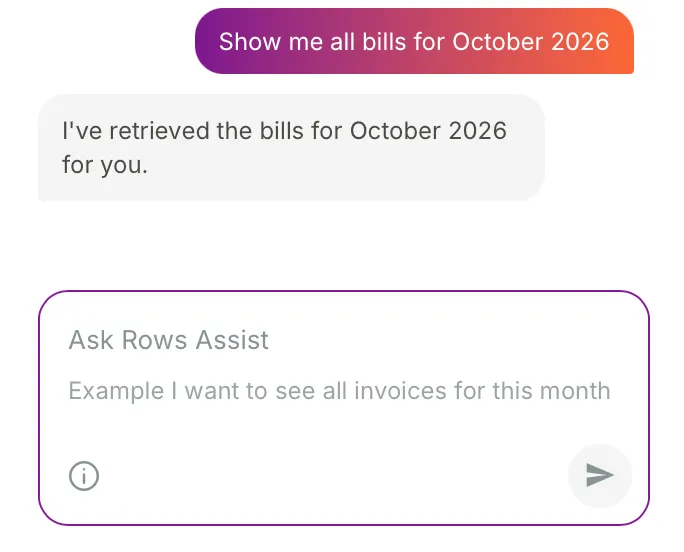
Rows pane, the question and the reply Check the table in Excel
In ExcelThe sheet now holds a Rows table: the entity, the table's name and when it ran in row 1, then a navy header with filters. On Xero, bills come in a table named Invoices, as Xero keeps bills in its invoices list. Filter it, or hide the columns you don't need.
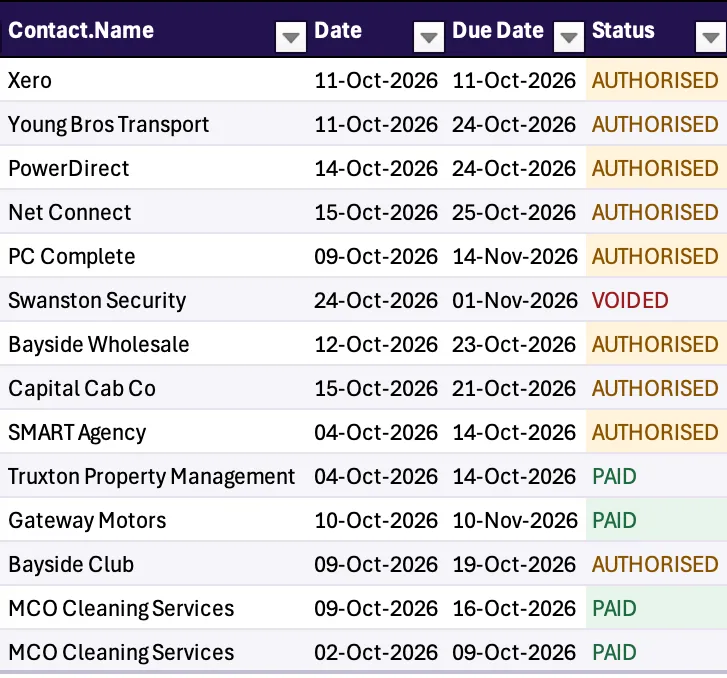
Excel, the table from Xero Ask which report to run
In ExcelNot sure which report you need? Ask, for example help me set up a profit and loss. Rows Assist suggests the versions that fit. Reply with the one to run, or ask about the differences.
Rows pane, Rows Assist suggests a report Ask a follow-up or start a new chat
In ExcelRows Assist remembers the last few messages, so you can ask a follow-up. To start again, select the pencil beside Ask Rows Assist. The table icon next to it lists the Rows sheets in your workbook. A chat is kept for 7 days.
What you can ask
- Questions about your figures
- Ask why a number moved, such as why did gross profit fall in October compared with September? Rows Assist answers in the chat.
- Changes to a sheet
- Sort, filter, format or hide parts of a sheet. Rows Assist only changes a sheet you already have when you ask it to.
- Posting back
- Open an editor, bring in records to edit and post them to Xero or QuickBooks Online. It posts only when you ask, so check the rows first, as in Post manual journals and records from Excel.
- Its limits
- Excel, accounting and finance only. Each user has a monthly allowance that resets with each calendar month.
If Rows Assist doesn't give you the data
It found nothing, or the wrong entity's data
Check the name under the Rows logo: Rows Assist only looks at that entity, so switch entity if you need another. Then ask again with the record and the period, such as bills for October 2026.
It says "Something went wrong. Please try again."
Ask again in different words, one request at a time. If it keeps happening, start a new chat with the pencil.
It says "You have exceeded your quota. The limit resets every month."
You've used this month's Rows Assist allowance. It resets at the start of the next calendar month. Running reports and posting from the Rows pane carry on as normal. If you need more, talk to us.
Next step
Next guideYour AI tool, wired into Xero, QuickBooks Online and Zoho BooksAsk about your books from Claude, ChatGPT, Microsoft Copilot or Cursor, with Rows MCP.Compare Rows Assist and Rows MCP in Xero, QuickBooks Online and Zoho Books MCP. Looking for something else? Browse every guide in the Help centre.
Talk to a person
Email support
Tell us what you see on screen. We reply within 24 hours on working days.
support@rowsapp.comBook an onboarding call
Free during your trial. We'll connect your entities with you and set up your first live report.
Book a call