Rows for Excel · Built for the people who close the books

Stop exporting.
Start refreshing.

Live Xero, QuickBooks Online and Zoho Books figures in Excel, and in your AI tool over MCP. Build the report once. Refresh it every month after.

Online sign-up opens on 20 November.

Available on Microsoft MarketplaceTrusted by accountants since 2017

Works with

Also Xero Practice Manager, Cin7, Excel and any AI tool over MCP.

All integrations →
XeroQuickBooks OnlineZoho BooksXero Practice ManagerCin7ExcelMCP · any AI tool

How it works

Connect. Work. Post back.

One connection, three steps. The video shows all of it in 90 seconds.

Rows for Excel in 90 seconds · narrated

Narrated, with captions (the CC button). Also on YouTube.

  1. 1

    Connect your accounting platform

    Sign in to Xero, QuickBooks Online or Zoho Books as you normally do. One entity or a hundred.

  2. 2

    Work in Excel or your AI tool

    Pull reports into the sheet and refresh them in place, or ask a question through AI Assist or your AI tool over MCP.

  3. 3

    Post back when you're ready

    Send journals, invoices and bills from Excel to your accounts, one at a time or in bulk from a posting template. You review every line before it posts.

What Rows does

Pull, refresh, post back, ask.

Four things your accounts can do once they live in Excel. Two bring data in, one sends it back, one answers.

01

Pull

Any report, any entity, as real cells in Excel.

Pick the entity, report and period from the task pane. It lands in Excel as real cells, so your formulas, formats and charts keep working. Or start from one of 36 ready-made templates: management report pack, Smart Profit and Loss, aged receivables and payables, and bulk uploads for invoices, journals and contacts.

02

Refresh

Month end in one click.

Open last month's workbook, press Refresh, and every report moves to the new period. Or switch on Automatic Refresh and the pack updates itself. No export, no copy and paste, no broken references.

< 1 min

to refresh a full pack

03

Post back

Create and edit in bulk, from the sheet you already have.

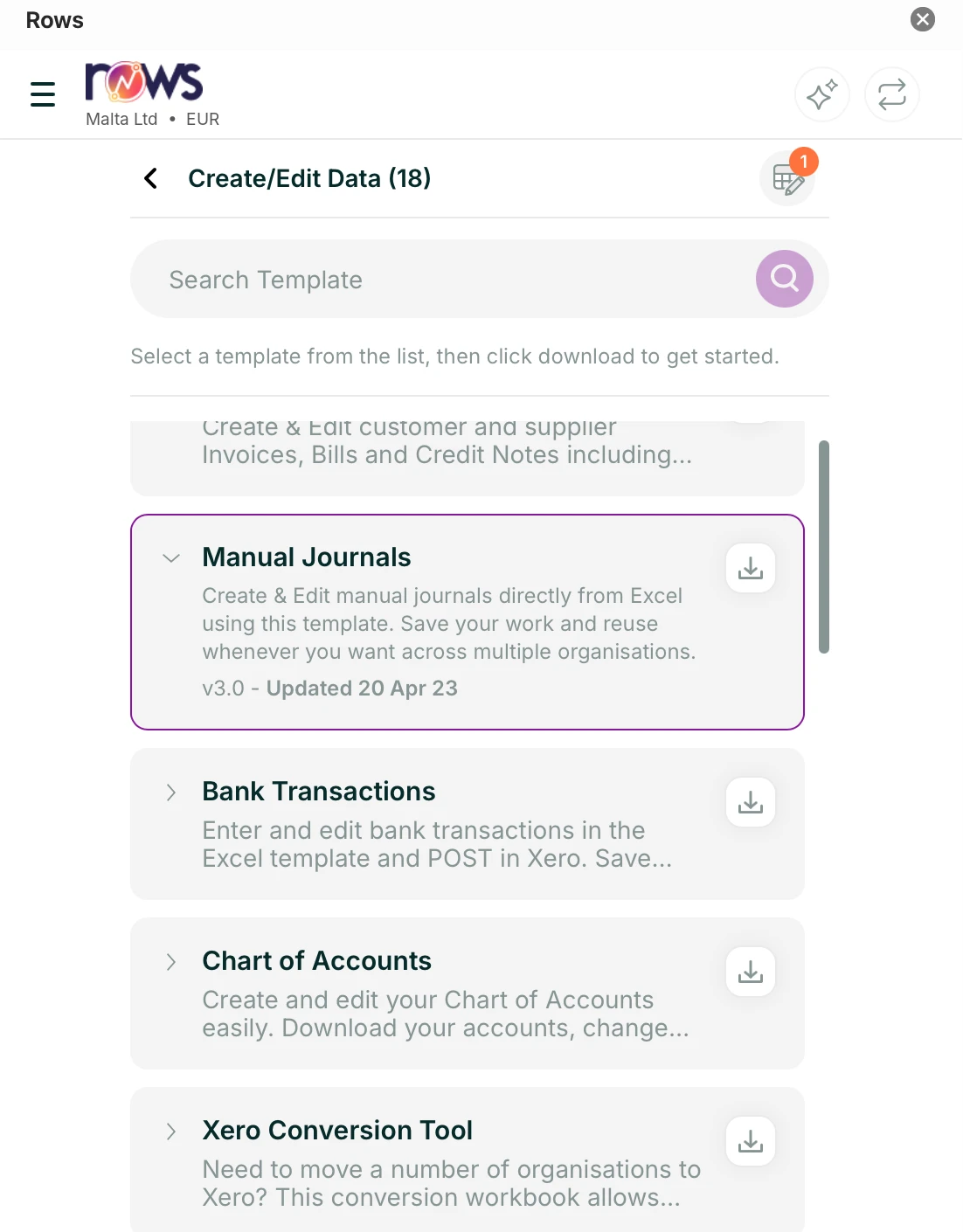
Fill a posting template with journals, invoices, bills or contacts, hundreds of lines at a time, and post them to Xero or QuickBooks Online in one go. Zoho Books is read-only. Every line is checked before it leaves Excel, and you choose how it lands.

ExcelXeroQuickBooks Online
  • Draft
  • Awaiting approval
  • Authorised

See how posting back works →

Rows for Excel Create/Edit Data pane with the Manual Journals template selected
04

Ask New

Ask your accounts a question.

AI Assist works inside Excel, in plain English: ask for a figure, a formula or a whole report, and the answer comes from the live figures in your connected entities. If you already use an AI tool, Rows MCP connects it to the same figures.

How Rows MCP works →

< 1 min

to refresh a full month end pack

10,000+

accountants and finance teams since 2017

5+

countries, Malta first

24 hours

to a reply from support, on working days

Rows MCP New

Rows MCP does what Xero's connector does, for every entity.

Keep the AI tool you already use. Rows MCP gives it every entity you manage, across Xero, QuickBooks Online and Zoho Books, not one at a time, and puts the same live figures in Excel. Ask about the whole group as well as one entity, and post back with approval.

Why switch from Xero's connector →

Rows MCP and Xero's connector compared
With your AI tool, you canXero's connectorRows MCP
Read live Xero data
Read QuickBooks Online and Zoho Books too
Ask across several entities in one question
Work with the same figures in Excel
Post back after a line-by-line review in Excel
AI Assist inside Excel, with no other tool open
New · Capture mode

Send a bill.
It's in your books.

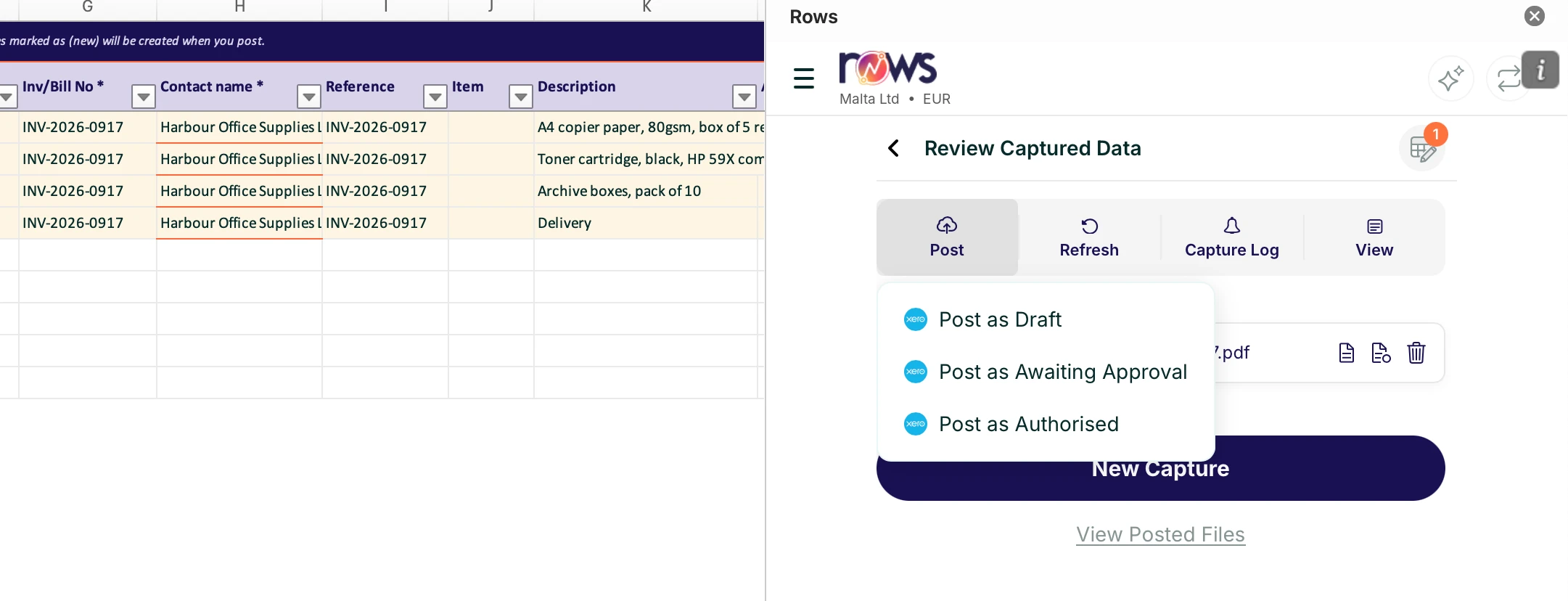
Upload photos and PDFs, forward them to a capture email, or link a OneDrive, SharePoint or Google Drive folder, all from the Rows pane in Excel. Rows reads the supplier, date, amounts, VAT and line items; you check the codes and post.

Rows for Excel capture review: four lines extracted from a Harbour Office Supplies bill, set to post, with the Post menu open showing Draft, Awaiting Approval and Authorised
  1. 1

    Capture

    Upload, email or a linked folder. Photos and PDFs both work.

  2. 2

    Review

    Account codes, tax rates and tracking categories, line by line in Excel.

  3. 3

    Approve and post

    As draft, awaiting approval or authorised, with a full activity trail.

The team behind Rows

Nine years of month ends already behind it.

Rows is built on the same foundation as DataDear, the Excel add-in accountants and finance teams have used since 2017, by the same team. Everything you relied on still works. Here is what is new.

Moving from DataDear to Rows →

4.1 / 5 12 DataDear reviews on G2
DataDear and Rows for Excel compared by feature
FeatureDataDearRows for Excel
Same as before
Xero and QuickBooks Online to Excel
Zoho Books
Multi-entity, refresh in place
Report and posting templates (36)
New in Rows
AI Assist in Excel
MCP access for AI tools
Capture mode

Customers

Trusted by accountants and finance teams since 2017.

BDOGovernment of MaltaWH PartnersdMSCSigmaGVZHQuazarTrustmooreNephos GroupBajada LyonsPwC

Security

Your data stays yours.

Built and supported in Malta

Your ledger stays where it is

Reports and posting read your figures live. Rows keeps only the documents you send to Capture.

Listed on Microsoft Marketplace

The add-in is published through Microsoft Marketplace, so it installs from the Excel ribbon on Windows and Mac.

You control the connection

You sign in on your platform's own page, so Rows never holds your password. Revoke access there at any time.

Support from Malta

A reply within 24 hours on working days. Guides written by the people who build it.

Questions

Before you install.

More in the help centre →

Does Rows work with Excel for Mac?

Yes. Rows is an Office add-in, so it runs in Excel for Windows and Mac.

What is MCP and which AI tools does it work with?

MCP is an open standard that lets an AI tool read data from other products, Rows included. Any AI tool that supports MCP can connect to Rows.

Can Rows change my ledger?

Only when you ask it to. Reports are read-only. Posting from Excel or Capture mode always goes through an approval step.

Can I connect more than one entity?

Yes. Every plan connects several entities, and you can pull them side by side in one workbook.

Which accounting platforms does Rows connect to?

Xero, QuickBooks Online and Zoho Books for your accounts, plus Xero Practice Manager, and Cin7 through Capture mode.

What does Rows cost, and what do I need?

Rows is a paid subscription with a free trial, and you do not need a card to start. You need an active subscription to Xero, QuickBooks Online or Zoho Books. See plans and prices →

Your first live report in less than two minutes.

Start the free trial, add Rows to Excel, connect Xero, press Refresh.

Online sign-up opens on 20 November. Until then, email support@rowsapp.com.